What is the importance of designing waiting and loading states in a way that gives the user a sense of the application's continuity

Why Applications Need Clear Indicators During Process Execution
When an application initiates a time-consuming process, the user requires a visual cue confirming that their request has been received and is being processed; this prevents the impression that the screen has frozen unexpectedly.
The absence of such an indicator can lead to a misunderstanding of the application's behavior—particularly when the process involves fetching data from the internet, sending information to a server, or handling a request that requires extra time.
A clear loading indicator reassures the user, letting them know they need to wait rather than repeatedly pressing the same button or navigating away in search of a result.
This indicator could take the form of a simple animation, a loading spinner, or a skeleton layout; the key is for it to align with the nature of the process without distracting the user while they wait.
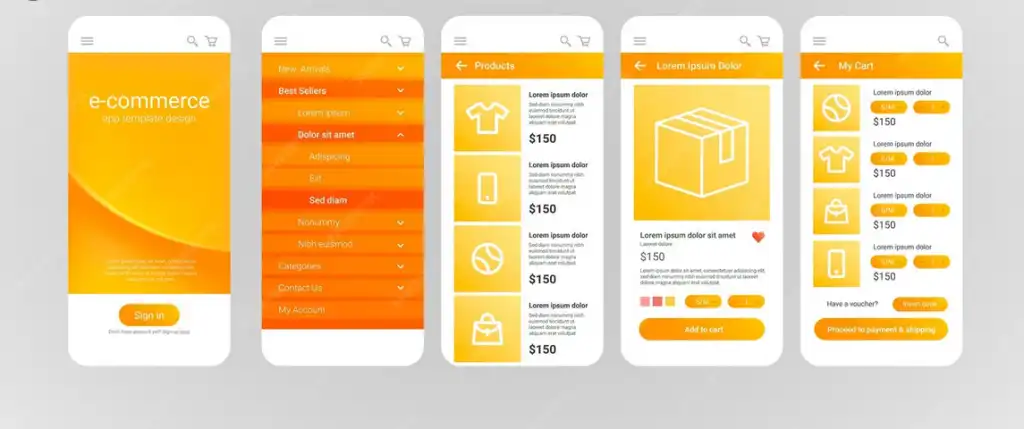
In e-commerce apps, for instance, products might appear as temporary placeholders before the actual images and full details load, making the transition from the placeholder state to the final content smoother.
Similarly, booking apps can use indicators to show that appointment slots are being retrieved or that the system is searching for available options, rather than leaving the user facing a blank space with no idea whether data will appear.

How Waiting Screens Prevent Users from Thinking the App Has Crashed
One of the most common issues users face when using applications is encountering a static, unchanging screen without any explanation; this can lead them to believe the app has stopped working, even if a process is actually running in the background.
Therefore, designing a clear "waiting state" is a crucial way to convey a simple message: the app has received the request and is currently processing it.
When an animation, message, or indicator appears to show that data is loading, the wait becomes understandable to the user rather than a confusing experience that casts doubt on the app's quality.
This approach is particularly important for processes involving payments, submitting requests, uploading files, or searching for results, as users need reassurance that the process is still active so they do not attempt to repeat the action.
Smart design does not require displaying technical details about servers, connections, or databases; instead, it simply provides information suited to the user's level of interaction, clearly indicating that a process is underway.
Certain buttons can also be temporarily disabled during the process to prevent the user from repeating the action, while a clear indicator explains why interaction is not possible at that moment.
Smart Loading Design and Its Impact on User Perception of App Speed
App speed is not merely a matter of the seconds a system takes to display data; it is also defined by how the waiting period—spanning the time between a command and the appearance of the result—is presented to the user.
An app might require a certain amount of time to fetch data, but a clear design for the waiting phase can make the process feel natural, preventing the user from perceiving it as sluggish or stalled.
Therefore, loading states should be viewed as an integral part of an app's "perceived performance"—the impression formed by the user based on how the interface responds to their actions.
When a user sees the screen react immediately to a tap—followed by an appropriate loading indicator—they understand that their command has been registered, even if the system needs a few extra moments to process the data.
Conversely, if there is no visual feedback after an interaction, the user might suspect the button failed or the connection is down, leading them to tap repeatedly and potentially triggering duplicate actions.
Smart design for waiting states can effectively communicate transitions between process stages, particularly when a request involves multiple steps before the final result appears.
For instance, search-based apps can display an indicator showing that results are being prepared, while delivery apps might show a status update indicating that the system is searching for options or refreshing information.

The Importance of Brief Messages During Wait Times in Building Trust in the App
Messages displayed to users during wait times play a crucial role in transforming an ambiguous moment into a clear experience, especially when the processes occurring behind the scenes are not immediately apparent.
A simple phrase—such as "Preparing your order" or "Loading data"—can suffice to explain the reason for the delay and prevent the user from assuming the app has stopped responding.
Word choice should be tailored to the specific process at hand; this ensures the user feels the message addresses their current action, rather than perceiving it as a generic, meaningless phrase that appears in every situation.
In ordering apps, for instance, the message might refer to order preparation or status updates, whereas in booking apps, it could indicate that available slots are being loaded or verified.
This approach provides context, making the user more willing to wait rather than impulsively closing the screen or restarting the process.
However, messages must remain brief and direct; users do not need lengthy technical explanations while waiting, as these can make the process seem unnecessarily complex.
Overusing messages—such as displaying a new one for every minor stage of the loading process—should be avoided, as excessive changes can confuse the user rather than clarify the situation.
Combining the message with a simple visual indicator allows the user to receive both textual information and a visual cue, reinforcing the fact that the app is actively working.
In some instances, a visual indicator alone may suffice, particularly when the process is brief and requires no specific explanation for the user. When a process is relatively long, such messages become even more important; they give the user a reason to stay engaged rather than waiting in uncertainty about whether any progress is being made.
Appropriate messaging also helps build trust by making the application more transparent regarding the actions the user initiates.
When users see a clear response to every step, they feel more comfortable using the app's various functions and are less likely to perceive the application as unstable or unpredictable.
It is crucial to integrate these messages into the app's design from the outset, ensuring the language remains consistent with the rest of the content so they do not appear as disjointed add-ons to the interface.
Furthermore, the messages must accurately reflect the system's actual state; otherwise, a user might see a notification indicating the process is ongoing when, in reality, it has already failed or concluded.
Ultimately, these brief status messages serve as a simple yet impactful tool for maintaining clarity and assuring the user that the application is tracking the process with them in real time.